The fake app looks good enough, and that’s the whole problem. A convincing icon, a familiar name, and a login screen that’s one typo away from yours can burn trust faster than a phishing email.
This isn’t a rare edge case anymore. Scam apps appear when attackers know your brand already has demand and can parasitize it. They don’t need to invent a story. They just need to hijack yours, then shove victims into a fake support flow, a lookalike rewards app, or a too-helpful wallet tool that quietly harvests credentials and payment details.
The moment a customer installs a fake app that looks like you, your team inherits the fallout. Support tickets spike. Social channels fill with angry screenshots. Fraud losses start getting attributed to your name, even when you didn’t touch the transaction.
That’s why we focus on monitoring and takedowns across the places scam apps live and spread. Speed matters when harm is happening in real time. Below is a practical reporting workflow to speed up removals, plus what to track so the same campaign is harder to re-launch with a new icon and name.
Summary
Scam app reporting only feels hard when it’s treated as a one-off fire drill. When it’s treated as a repeatable workflow, removals get faster because the team isn’t reinventing the same steps every time. Speed comes from a consistent evidence pack that’s quick to assemble, knowing where to report so you’re not stuck chasing the right form or policy category, and tracking the campaign instead of a single app since attackers re-upload and reuse the same building blocks, like naming patterns, icons, landing pages, phone numbers, and fake support handles. This article breaks down what to capture, how to route reports through app stores and the wider ecosystem, and how to verify that what's removed actually stays removed.
Why Are Fake Apps So Effective at Stealing Trust?
Fake apps work because users trust the container. People have been trained to think “the app store is the safe place,” so they drop their guard the moment a listing appears official.
Attackers exploit that trust with familiar brand signals. Name, logo, screenshots, support language, and fake reviews. Then they route victims into high-value actions, such as credential entry, OTP capture, payment, crypto transfers, or “identity verification” that’s actually data theft.
A scam app is worth reporting urgently if it’s impersonating your brand identity or your customer workflows. If it can realistically confuse a customer or employee, it can realistically cause harm.
High-signal red flags include a brand name followed by a modifier such as “support,” “rewards,” “security,” “wallet,” “verify,” or “claims.” Another signal is a cloned login or payment flow, especially if the app pushes users off-platform to a web page, chat app, or phone number. If it’s asking for credentials, OTPs, card details, seed phrases, or remote access, it’s not “maybe.” It’s now.
How Do Scam Apps Usually Get Distributed?
Most scam app distribution starts where discovery is easiest, and friction is lowest. That includes search ads, social ads, influencer-style posts, SEO pages that recommend downloads, and direct messages from fake support accounts.
Once the victim is primed, the attacker directs them to an app listing, an APK download page (a website that distributes an Android installation file outside Google Play, sometimes via third-party stores or direct downloads), or a third-party store. The listing is usually just one step in the attack chain. The real fight is upstream and downstream. Where the victim came from, and what the app connects to.
How Do You Collect Evidence without Turning It Into a Forensics Project?
Use a dedicated test device or an isolated environment when possible, and avoid entering real credentials or payment details. The objective is to document impersonation and user-risk signals, not to “complete” the scam flow. Collect evidence by documenting what proves impersonation and what demonstrates real user risk, then proceed. Provide app stores and hosting providers with sufficient information to quickly identify that this listing is misusing your brand and putting people in danger. Most teams lose time by either over-collecting or under-collecting; a single screenshot will not magically convey intent. The sweet spot is a tight evidence pack that takes 10 to 15 minutes to assemble, is easy to reuse across reports, and doesn’t depend on the one person who knows where everything lives.
Another reason to keep it lightweight is that scam apps are constantly evolving. Listings change. Developer names rotate. Screenshots get swapped. Links get updated. If you wait until you’ve documented every last detail, you’re documenting a moving target while customers keep downloading it. Capture only the minimum required to prove the case, save it in a consistent format, and reuse the same structure every time so you can file reports across stores and APK sites without redoing the work from scratch.
What Should You Capture from the Listing?
Capture the full store URL, developer name, version history, publish date, and screenshots of the listing. Grab the app name as displayed, the icon, the description text, and any “official” claims.
Also capture anything that ties the app to your brand. Misused logos, trademarked phrases, references to customer support, and screenshots that mimic your UI. If the listing includes a website, email address, phone number, or support link, capture them as well. Those are often reusable infrastructure you can take down in parallel. If available, capture the package name (Android) or app identifier (iOS), since it helps stores and investigators distinguish clones with similar display names.
What Should You Capture from the App Itself?
Capture the first-run experience and the highest-risk screens. Login, OTP prompts, payment requests, recovery phrases, “verification,” and any messages pushing users to call, chat, or download a second app. If the app redirects to a web page, capture the destination URL and any intermediate domains shown during the redirect, if visible. Even a single clean screenshot of the redirect is enough to link the app to domains and pages that can be reported separately.
How Do App Store Reporting Paths Actually Work?
App store reporting is mostly policy-matching plus evidence. Stores act faster when your report maps cleanly to categories like impersonation, trademark infringement, or fraud, and when the evidence is easy to verify. Outcomes also improve when you indicate that the listing is part of a repeat campaign, because re-uploads and “new developer” swaps are standard attacker tactics.
What’s Different about Official Stores vs. APK Ecosystems?
Official stores tend to have more structured reporting, but reviews and enforcement can still be uneven. APK ecosystems move faster and re-upload faster. They also fragment the reporting surface across multiple sites and resellers.
That means the operational approach changes. For official stores, the goal is a clean, complete report that maps to policy. For APK ecosystems, the goal is coverage and persistence, because the attacker will try five more mirrors before lunch.
Starting around here is where the internal process usually makes or breaks outcomes. If your team needs a baseline for how to validate suspected fake apps, fake app detection frameworks usually focus on brand signals, developer provenance, and off-platform redirection patterns.
Where Do Most Scam App Reporting Efforts Break Down?
They break down when teams treat the app like the whole incident. It’s not. It’s one node in a cluster. Another common failure is slow evidence collection. People argue over “do we have enough proof?” while customers are actively getting scammed. If the listing is impersonating your brand and the flow looks designed to capture sensitive data, you already have enough to report. The third failure is a lack of follow-through. “Reported” is not a status. Removed is a status. Also, being removed from one store isn’t the same as being removed from the internet.
If you want the mindset shift behind this approach, cluster-based brand fraud investigation is the difference between “one bad listing” and “one repeatable campaign.”
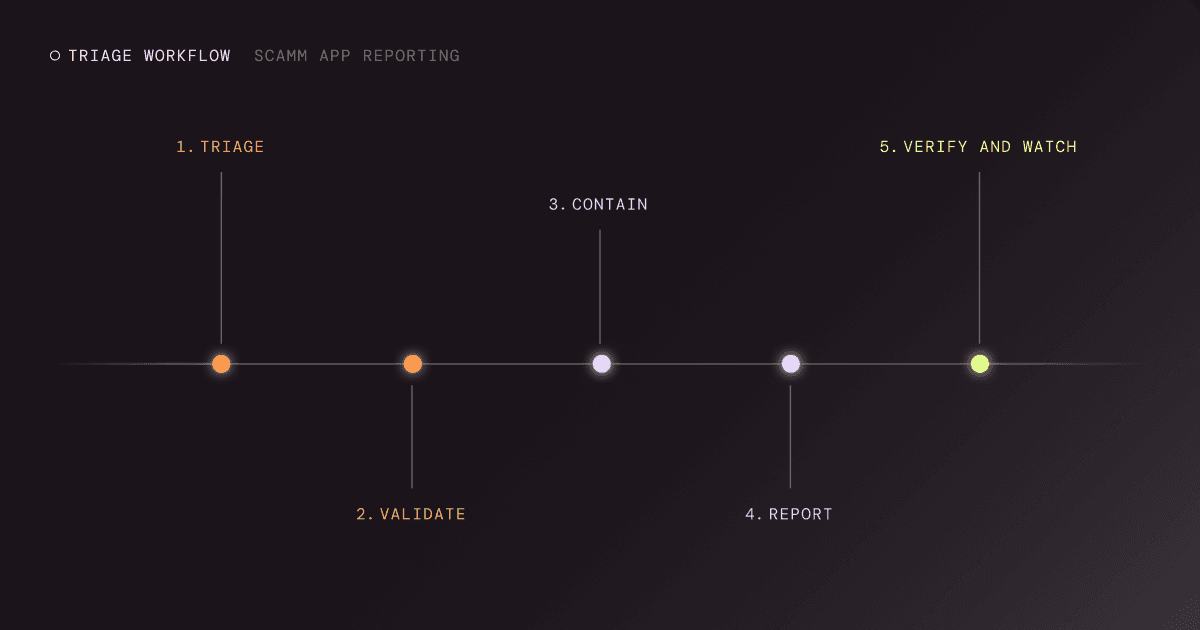
A Fast Triage Workflow for Scam App Reporting
Use a triage workflow that gets action in minutes. If a new analyst joined tomorrow, could they follow your steps without guessing, and would you trust the outcome? Scam app reporting breaks down when it becomes a debate over severity, even as customers are already installing the malicious app. A good workflow makes the first 30 minutes boring on purpose. Same evidence pack, same decision points, same escalation path, same owners. That’s how you cut the time between detection and removal, and it’s how you keep your support team from becoming your primary monitoring system.
Step 1: Triage for Impact
Start by answering one question. Who can be harmed today? Customer logins, payments, crypto, healthcare portals, and employee SSO flows all increase priority. If you’re seeing ads or social posts pointing to the app, raise it again.
Step 2: Validate Impersonation
Validate by matching brand signals and user flows. Name, icon, screenshots, and claims. Then confirm whether the app is mimicking your login or support experience.
Step 3: Contain the Blast Radius
Contain by warning internal teams who will get hit first. Support, fraud ops, social, and comms. If you have a customer trust page or status page, this is when it earns its keep.
Step 4: Report Across the Kill Chain
Report the app listing, then report the connected infrastructure. Domains, fake support accounts, ad creative, landing pages, phone numbers. When you remove the feeder channels, you reduce new installs even before the listing is down.
If your program is still building that muscle, our overview of brand protection workflows can help frame the “multi-asset” part of the job.
Step 5: Verify Removal and Watch Re-Uploads
Verify the listing is actually unavailable in-region. Then watch for clones. Same icon. Same developer pattern. Same description text with minor changes. Re-uploads are not a surprise. They’re the plan.
How Do You Stop the Same Crew from Re-Uploading Tomorrow?
You stop re-uploads by tracking patterns and infrastructure, not just app IDs. The fastest teams build a short list of “reusable attacker building blocks,” then remove those too.
That includes developer identities, certificate patterns, recurring keywords, support phone numbers, social handles, landing page templates, redirect domains, and ad accounts. When you can connect the dots, you can report more confidently and more broadly. This is where automation and correlation matter. Correlating campaign signals turns “another fake app” into “the same operation, again,” which changes prioritization and speeds response.
How Can You Remove Fake Apps Faster without Adding Headcount?
You remove fake apps faster by shortening the time between detection and action and reducing the manual work required to prove the case. On our platform, three things tend to reduce cycle time in real programs. First, detection across app ecosystems, including stores and APK sources, so you are not waiting on customer complaints to find the problem. Second, validation that ties the app to brand impersonation signals and connected infrastructure, so reports are complete. Third, persistent takedown execution and re-upload monitoring are required, as attackers continuously test what they can get away with. For more details on our approach to the end-to-end workflow, see the platform overview.
Key Takeaways
- Scam app reporting moves fastest when evidence is collected once and reused across store and infrastructure reports.
- Fake apps are rarely isolated. Reporting is more effective when it covers the entire campaign, not just a single listing.
- Verification and re-upload monitoring are part of the job. “Removed” needs to stay removed.
- Speed improves when detection, validation, and takedown execution run as a repeatable workflow.
Ready to Make Scam App Reporting Faster and Less Painful?
If scam apps are spoofing your brand, you are not trying to “win” a marketplace form. You are trying to protect customers, shut down the campaign quickly, and reduce re-uploads.
If your team is tired of playing whack-a-mole with fake apps and the infrastructure around them, talk to us. We’ll show you how we help brands find impersonating apps earlier, remove them faster, and stay ahead of re-uploads.